
WIDE GAMUT MONITOR TEST
by G. Ballard, a professional Web designer and color-management consultant, San Diego, USA
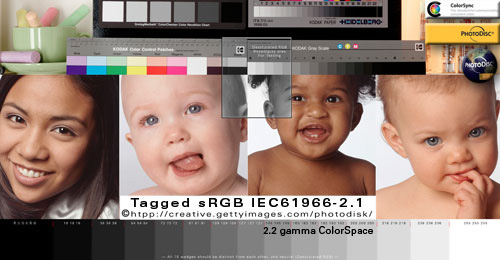
If you are experiencing intense red color saturation problems on the Internet, click on the above image to rollover an un-tagged sRGB image — if either or both images show the problem — please read on to learn why this is happening and how to fix it.
NUTSHELL:
The problem is wide-gamut monitors are Adobe RGB-type display devices -- and Microsoft Windows and Apple OSX operating systems are engineered for sRGB-compliant display environments. The wide-gamut standard is great for Photoshop and color-managed applications that compensate for it, but not so good otherwise unless you like cartoonish over-saturated colors.
This demonstration will make a more obvious point if you use a color-managed Mac Web browser like SAFARI or FIREFOX (set to Value 1) for Windows 8 7 Vista XP and OS-X.
Any color-managed Web browser will demonstrate my points effectively if you know what to look for, but Mozilla FIREFOX (set to Value 1) will solve the widegamut problem problem 100% depending on the version and user settings.
ONLY Firefox (Value1) Web browser provides users with "color accuracy" AND "color consistencey" across CSS, Hex, HTML.
FireFox® is the only solution I know to solve this oversaturation problem on Mac OS-X® and Windows® operating systems.
WINDOWS COLOR MANAGEMENT
SOURCE> sRGB
a half approach to CMS... |
 As an Apple/Adobe/Firefox fan boy of their "full" approach to color management (Source> Monitor) — I am disappointed by Microsoft Web browsers' lame approach (Source> sRGB). As an Apple/Adobe/Firefox fan boy of their "full" approach to color management (Source> Monitor) — I am disappointed by Microsoft Web browsers' lame approach (Source> sRGB).
My recent observations concluded that some Windows apps only do "half" or limited color management — meaning color managed Web browsers on Windows only Convert tagged documents to sRGB*.
My tests on a wide gamut monitor included color-managed Windows versions of Chrome, Internet Explorer IE, and Safari — these browsers "matched" the sRGB rollovers, but they still showed the wide gamut red error in both tagged and untagged sRGB rollovers:(
Software updates and user settings may change the results of my observations so be sure to perform your own tests to prove or disprove my theories on your monitors.
*Firefox with Value 1 is the exception on Windows — Firefox not only Converts tagged images to the default monitor profile the same as Photoshop, Firefox also Assigns sRGB to all untagged elements and Converts them to the monitor profile for a 100% color-managed environment.
|
|
ABOUT MY WIDE-GAMUT TEST TUTORIAL
I prepared this Web color tutorial to test, review and troubleshoot color problems with the Apple Macintosh OS-X and Microsoft Windows operating systems because my new wide-gamut monitor was displaying greatly over-saturated red colors on the Internet, including applications like Finder, Windows Explorer — even my desktop and application icons!
Specifically, I wanted to learn about how the new so-called wide-gamut LCD panel flat monitors interact with untagged RGB color in color-managed Web browsers like Safari for the Mac OSX and Windows XP Vista 7 operating systems, and Firefox.
Writers dubbed the new LCD technology "Adobe RGB monitors" because they have a wider color gamut range closer to Adobe RGB (1998), 92% of NTSC. And they boast of specs like covers-reproduces 96% of Adobe RGB color space, Delta-E differences, TFT, S-IPS, TN, 1080p HD, 16:10 aspect ratio, 10- 12-bit Look-Up Table, Photoshop 8 bit, 16-bit.
MY MAIN POINT is the Internet, Windows Explorer and Apple Finder are based on standard RGB (sRGB color space) and these new high-gamut monitors turn my Web browsers, system and desktop into cartoonish-looking, oversaturated color — what a headache!
Long story short: I could find no real solution so I returned my wide gamut monitor and bought a "standard gamut" monitor for my professional color work.
FIREFOX FULL COLOR MANAGEMENT |THEORY | BUYER ADVICE | WORK AROUNDS | PHOTOSHOP TESTS
|

Disclaimer: |
| Without a wide-gamut monitor, Windows 7 or OSX 10.7 systems to test on now, I have to rely on what people with these configurations tell me they are observing.
Thanks to recent feedback, I've learned that BOTH Windows and Apple applications more than likely send untagged and unmanaged RGB "straight through" to the monitor unaltered — including Finder, iPhoto, Safari, Windows Explorer, as do most Web browsers.
That means both Windows and Mac computers running wide-gamut monitors are showing the intense saturation problem.
The one exception is Firefox, as noted above.
I initially got confused by Windows "default" terminology and thought Windows Color System (WCS) must be assuming its default space, sRGB, and Converting it to the monitor profile, but I was apparently wrong.
Windows (and OSX) likely send untagged and unmanaged RGB numbers straight through to the monitor unaltered.
The engineering "presumption" of that approach is their default color space (sRGB) lines everything up for display on sRGB-compliant devices.
Of course, that presumption is correct and "accurate" ONLY when the monitor RGB "matches" sRGB — and most if not all monitor spaces do not "match" sRGB, especially the wide-gamut space which is much closer to the Adobe RGB 1998 color space.
Hence, the problem is exactly like opening an sRGB document in Photoshop, and Assigning Adobe RGB to it (if you want to duplicate the effect on a standard monitor).
But the current default profile is sRGB because that's how Windows and Apple operating systems and Web applications are being developed.
|
| I should add: Adobe Flash® files (at least some of them) still show the oversaturation in sRGB files in Firefox. The proof is to take a screenshot of the problem in your Web browser, open the screenshot in Photoshop, and Edit> Assign Profile: sRGB — that should snap the true color back. |
FIRE FOX "FULL COLOR MANAGEMENT"
the only solution: |
|
HERE IS A SIMPLE TEST rollover to determine if your Web browser is Assigning sRGB to Un-tagged images AND Converting (changing) them to your monitor profile — and/or if Firefox is using "Full Color Management" option (Value 1).
First, please be sure to DOWNLOAD and install the latest FIREFOX Internet browser and enable its "Value 1" mode for Full Color Management (see instructions on link).
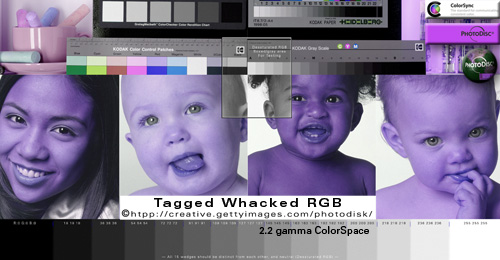
If the "Tagged Whacked RGB" image looks correct (not horrid blue) — your Web browser is reading embedded profiles and Converting (re-mapping, altering) them to your monitor profile.
If the "Tagged Whacked RGB" image displays blue — your Web browser is not color-managed and my test examples will make little sense.
If the Tagged Whacked RGB image absolutely dead-on "MATCHES" its "Untagged sRGB IEC61966-2.1" rollover, your browser is Assuming-Assigning-Applying the sRGB profile by default, and Converting it to your monitor profile.
This is what FireFox-Mozilla developers call "Full color Management" (Value 1).
MORE INFORMATION about setting up color management options in FireFox, including screenshots and detailed information about Firefox's color-management options, how to configure them.
|
| "It is the theory that decides what we can observe." - Albert Einstein |
|
In any case, your Web browser behavior is easy to observe in this rollover example using three elements (HTML Hex color, Untagged Hex .jpg, Tagged Hex .jpg):
The above HTML box is filled with the Hex-specified AF641E reddish color.
In most if not all Web browsers — the box's HTML Hex color is being sent straight to the monitor unaltered — except Firefox with its "Full Color Management" enabled which is Assigning sRGB and Converting it to monitor RGB.
The Photoshop logo backgrounds are filled with the exact same AF641E (mouse over the logo to roll over its mate).
The tagged and untagged pixel-based logo .jpg graphics are identical except one has an embedded sRGB profile and the other had its profile stripped for this example.
The untagged logo RGB numbers are being sent straight to the monitor unaltered in most if not all Web browsers — except Firefox with its "Full Color Management" enabled which is Converting it to Monitor RGB.
The embedded profile in the Tagged logo file — in color-managed Web browsers — is being read and Converted to the monitor profile for "accurate" display. Non-managed browsers ignore the embedded profile and send the RGB straight through to the monitor unaltered.
Conclusion:
If the red in the box "matches" the red in both rollovers — your Web browser is either:
1) in compliance with Firefox's "Full Color Management Standard" (it is displaying all three elements "accurately"), or
2) it is not being color managed at all — the numbers are being sent straight through to the monitor unaltered — this provides "consistency" within the elements, but not "accuracy."
3) If your browser manages only tagged images — it is sending the untagged elements straight through to the monitor unchanged — the red in the tagged logo background will mismatch the other two red backgrounds because it is being Converted to the monitor space for "accuracy."
The genius of Firefox's approach to its Full Color Management on the Internet is it gives us "consistency" AND "accuracy" in an environment that mixes tagged and untagged elements — to my knowledge, no other Web browser does both.
|
MORE ON WIDE-GAMUT MONITORS
if you considering buying one |
|
PERSONALLY:
After I spotted the problem in my new Dell 2408WFP wide-gamut monitor — I was very interested in the EIZO ColorEdge CG241W ($2,500 USD) and how it displays untagged sRGB in Mac browsers.
But EIZO support wrote me a meaningless canned response to that question so I moved on. BTW, the EIZO wide-gamut panels do exhibit the over-saturation problem.
On the other hand, X-Rite GretagMacbeth tech support wrote me clearly their monitor calibrating packages had no workaround for profiling wide-gamut monitors and viewing in Mac web browsers because of how the Mac operating system deals with untagged RGB.
Dell support told me they are aware of this issue on OS-X and they returned their monitor with no further questions for a full refund.
- NOTE: DELL customer service and tech support was truly outstanding and forthright to resolve the problem, I would not hesitate to try DELL products again.
Given I need a quality monitor for Adobe Photoshop AND web surfing — I bought a NEC LCD2490WUXi 24", a more standard gamut monitor that NEC says achieves 76% Adobe RGB coverage which is very similar to the Apple Cinema HD display panels.
I really like the color on my 30" Apple Cinema Displays, but choose the NEC model for its dual DVI-I DVI-D connections and standard four-year warranty included in its retail price.
This beats Apple's one fixed DVI port and one-year warranty.
I am very pleased with my NEC LCD2490WUXi 24-inch professional monitor and highly recommend it for professional color proofing for prepress, desktop printing and web designing.
|
|
A TECHNICAL PERSPECTIVE:
Several years ago CarL Lang wrote in a (now archived) Apple Mailing List (Eizo CG241W vs. NEC 2690 SpectraView):
"A wide gamut LCD display is not a good thing for most (95%) of high end users. The data that leaves your graphic card and travels over the DVI cable is 8 bit per component.
"You can't change this.
The OS, ICC CMMs, the graphic card, the DVI spec, and Photoshop will all have to be upgraded before this will change and that's going to take a while.
"What does this mean to you?
"It means that when you send RGB data to a wide gamut display the colorimetric distance between any two colors is much larger.
"As an example, lets say you have two adjacent color patches one is 230,240,200 and the patch next to it is 230,241,200.
"On a standard LCD or CRT those two colors may be around .8 Delta E apart. On an Adobe RGB display those colors might be 2 Delta E apart on an ECI RGB display this could be as high as 4 delta E.
"It's very nice to be able to display all kinds of saturated colors you may never use in your photographs, however, if the smallest visible adjustment you can make to a skin tone is 4 delta E you will become very frustrated very quickly."
Peter added: "DVI has still 8 bit per channel (for the signal), so there was no change in the last two years. I would like to hear about yours and Karls real word experience if which situations you still prefer a standard (about 70% NTSC) gamut display and when (if ever) you will prefer a wide-gamut display?"
2012 updates, Adobe Photoshop forum "Photoshop 10-bit support":
- Adobe engineer Chris Cox wrote: Photoshop CS5 already supports 10 bit/channel displays, and has been waiting for the video card vendors to fully enable the functionality. Unfortunately Apple has indicated that they have no plans to support higher bit depth displays....
In CS6 (under Windows), there is a 30 Bit Display option and now it works fine: "Advanced Graphics Processor Settings".
|
|
SNOW LEOPARD 10.6 Advancements:
Apple OSX (finally) switched its default monitor gamma to 2.2 in 10.6 Snow Leopard — and 10.7 Lion changed its Default space to sRGB — but neither solves the wide-gamut problem BECAUSE OSX still passes untagged and unmanaged RGB straight through to the monitor unchanged.
Apple (and Microsoft) could fix the problem (as Firefox did) by 'simply' allowing users to set their Default RGB to sRGB so it Assigns and Converts it to Monitor RGB — in the past, ColorSync had this option, but it never actually worked.
|
WORK AROUNDS
things I've tried, and things I've heard about: |
|
First, as previous stated: Mozilla-Firefox with its Full Color Management Value 1 enabled is the only Web browser I've seen that actually fixes the saturation problem associated with widegamut monitors on the Internet.
If this type of over saturation bothers you like it did me, I highly recommend you avoid buying wide-gamut monitors until Windows and Apple address the problems with how they deal with unmanaged color.
CALIBRATE CUSTOM MONITOR PROFILE (or use factory default profile):
At first I thought proper profiling the device would surely solve the problem, but NEITHER hardware calibrating a custom monitor profile nor using the monitor's factory OEM profile fixes the problem because they are always going to be much closer to Adobe RGB than sRGB — the monitor is physically an Adobe RGB device (not an sRGB device!).
sRGB PRESET:
Set the monitor's hardware to its sRGB Preset to dumb it down (and recalibrate the monitor) — this made my Photoshop and Internet color look weak like a tired old CRT, but it did get rid of the over-saturation issues.
One chatroom 'genius' recommends setting the monitor's preset to sRGB; the operating system's default monitor profile to sRGB (and don't calibrate the monitor); and Photoshop's Working RGB to sRGB for an "sRGB viewing environment." I have to say that sets Photoshop up to behave like Internet Explorer on an uncalibrated system — yikes!
|
| Photoshop tests to emulate the problem: |
|
DUPLICATE THE EFFECT IN PHOTOSHOP (on a wide-gamut monitor):
1) Open and Convert a RGB file to sRGB (Edit> Convert to Profile) if it is not already in sRGB.
2) View> Proof Setup> Monitor RGB
This pinpoints the problem and shows exactly what the Web browsers are doing — that move strips the profile and sends the RGB numbers straight to the monitor (for all practical purposes).
DUPLICATE THE EFFECT IN PHOTOSHOP (on a standard-gamut monitor):
1) Open and Convert a RGB file to sRGB (Edit> Convert to Profile) if it is not already in sRGB.
2) Edit> Assign Profile: Adobe RGB 1998
This pinpoints the problem and shows exactly what the Web browsers (and my previous test) are doing — sending sRGB numbers straight to the monitor.
ADOBE RGB (1998) rollovers:
As seen in rollover below, Untagged Adobe RGB doesn't shift much on the wide-gamut monitors using Safari color-managed web browser in OSX or Windows.
This is because wide-gamut monitor space are much closer to AdobeRGB than sRGB.
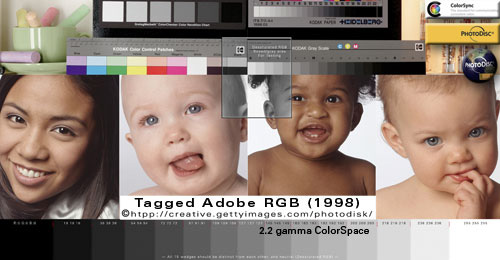
Note: The above two rollover images are identical except one has and embedded profile, and the Untagged file had its profile stripped for this tutorial.
What Are the Top Best Monitors?
Dell 2407WFP 24" UltraSharp Wide Screen Flat Panel LCD
Dell Ultrasharp 2408WFP (24")
DELL UltraSharp 3008WFP (30" monitor) $1,900
EIZO ColorEdge CG241W (24-inch monitor) $2,500
Eizo CG301W 30" Widescreen ColorEdge Monitor, $5,000
NEC MultiSync LCD2490WUXi-BK (24-inch)
This is a work in progress....
Microsoft®, Windows®, Apple®, OS-X®, Safari®, Firefox®, Adobe® Photoshop® are registered trademarks of their respective companies
|
Terms of Use • Privacy Statement • Site Map
Home • About Us • Mission Statement • Press Kit • Contact Us |
|